

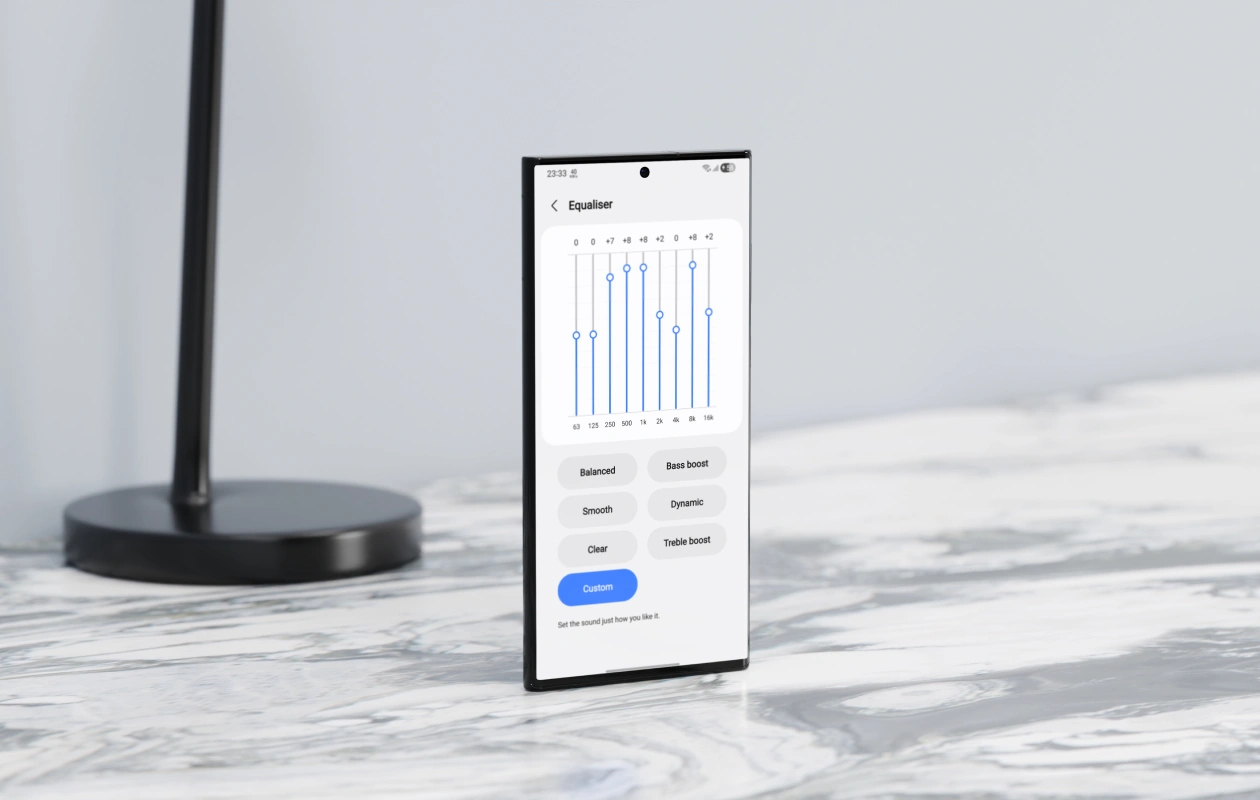
Today, I realized that my Galaxy phone can sound way better than it ever has since I bought it. All the magic happened with a few simple equalizer tweaks. Many audiophiles probably already know this trick, but if you don’t, you’re missing out. Copy these equalizer settings and you’ll notice a greater improvement in how your Samsung Galaxy phone sounds.
We all know that an equalizer exists on every device, which allows us to set up the audio settings according to our preferences. Most of us have already tried tweaking it at least once, only to switch back to the default EQ afterward because of a lack of expertise or knowledge. As a result, many users, including myself, don’t usually bother changing the default EQ setup at all.
All devices, whether Galaxy or non-Galaxy devices, come with a balanced EQ setting because audio preferences vary from user to user. Most people either never change it because they’re unaware of the option or avoid tweaking it because they don’t know the ideal settings.
Ice Universe recently shared a video on X showcasing an EQ setup that sounds far better than the default setup. The video clearly shows the difference between the default Balanced preset and the Custom EQ setup. For many users, this custom setup could be close to perfect tuning. Here are the EQ values for each frequency band:
- 250: +7
- 500: +8
- 1k: +8
- 2k: +2
- 4k: 0
- 8k: +8
- 16k: +2
If you check the post’s comments, you’ll find many users sharing their own custom audio settings that you can copy and choose the one that suits your taste the best.
It is all about testing, which demands time. That’s why many of us settle for the default Balanced setting. However, switching to a good setup can make a significant difference, especially for frequent music listeners. Not only does it enhance the music experience, but it also improves the quality of the video content.
This isn’t a new concept; the manual EQ option has been there for a long time, but many people still don’t try tweaking the setup and stick to the default settings.
If you use a custom EQ setting, do share the values in comments so that other users can also try it.
Explore More:
