


When I shopped for a low-cost laptop for college, Apple’s lineup came to mind first. You know—the style and the reputation of MacBooks. But even with the student discount, they still cost more than the alternatives. Up until now, the Air held the title for the cheapest MacBook, and the jump to the M5 just pushed that price higher. Then the MacBook Neo drops the entry price to an all-time low, making the Apple laptop experience accessible to more people.
Now the question is whether the Neo can hold its own against the Air or if sticking with the classic still makes sense. In my MacBook Neo vs. M5 MacBook Air guide, I help you figure out which one fits your setup better.
Design and display
At first glance, the MacBook Neo keeps Apple’s signature look, featuring the same premium recycled aluminum found on higher-end Macs, along with a full keyboard and large trackpad.
The first standout difference is the color selection. The Neo comes in citrus, silver, indigo, and blush. I lean toward silver—it’s timeless and matches almost anything. But the blush? I love it. Apple has stepped up its game with color, though I suspect I might tire of it over time. Which one would you pick?

The MacBook Neo has a 13.0-inch screen, putting it among Apple’s smallest laptops. The MacBook Air, by comparison, has a 13.6-inch display. Both weigh the same at 2.7 pounds, so the Neo slides into a bag with ease. The Neo screen hits up to 500 nits of brightness, matching the 13-inch Air.
Sometimes I notice the notch on my MacBook Air and think of that funny Samsung ad with people whose haircuts looked like Apple notches. The MacBook Neo skips the notch, keeping its front camera in the top bezel. However, that camera is a 1080p FaceTime model, while the MacBook Air uses the superior 12 MP Center Stage camera.

Performance
The Neo is Apple’s first laptop with a smartphone processor, running on the iPhone A18 Pro chip. Ahead of launch week, Apple hosted select press members for hands-on demos. From what I’ve read, people found the Neo smooth at web browsing, switching tabs, and editing documents.
The MacBook Air focuses on raw power, packing a 10-core M5 chip, which first appeared in last year’s 14-inch MacBook Pro. The M5 improves graphics with a new integrated architecture and adds neural accelerator cores to each GPU unit.
Since the M1 arrived in 2020, Apple’s chips have felt like a breath of fresh air. By 2021, they ran far ahead of Intel and AMD on performance and efficiency. Apple has kept that momentum going. Some debate whether using a phone chip in the Neo limits its Mac capabilities. In reality, the line between iPhone and Mac chips has blurred so much that the concern feels overstated.

Apple MacBook Neo
13.0-inch display and 256 GB storage
I wouldn’t expect to do serious video work or heavy tasks on the Neo. That would be ambitious. But it should handle light photo editing, multitasking, and everyday tasks with ease. As long as you don’t open a huge number of programs at once, I don’t expect the MacBook Neo to slow down.
I imagine a student, advertising copywriter, or customer support agent nailing their everyday work on the Neo. But professionals juggling multiple apps—like a product manager or developer watching tutorials in one tab while coding in Visual Studio Code—will want the MacBook Air with M5.
Video editing and gaming
If you edit video, play hardcore games, do 3D rendering, work with local AI, or handle large photo batches, skip both the Neo and the Air. Any task that pushes the CPU or GPU for long periods calls for the M5 MacBook Pro.

Apple MacBook Pro with M5 Pro
14-inch display and 1 TB of storage
That said, the Air can handle casual gaming after work hours. If you need a MacBook for work but want to game occasionally, it will manage.
Battery life
I care a lot about battery life. Laptops keep getting thinner and lighter, but that often comes at the cost of staying powered throughout the day. The MacBook Neo still manages 16 hours, which is solid, and the MacBook Air edges ahead with 18 hours.
Whichever laptop you pick, you’ll benefit from Apple’s leading battery life, essentially doubling the usable time of many rivals. You likely won’t need a charger on most days.
Connectivity and charging
The Neo includes three ports: USB 3 (USB-C), USB 2 (USB-C), and a 3.5 mm headphone jack. Meanwhile, the M5 MacBook Air adds two Thunderbolt 4 (USB-C) ports, a headphone jack, and MagSafe 3. Missing Thunderbolt 4 on the Neo won’t bother most users. If you have to ask about it, you probably don’t need it.
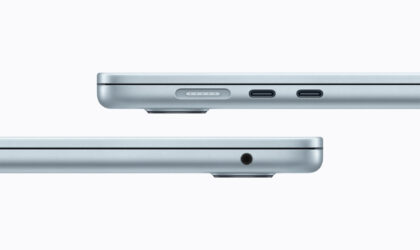
Apple MacBook Air with M5
13-inch display and 512 GB storage
Wireless support differs too. The Neo has Wi-Fi 6E and Bluetooth 6, while the Air uses the N1 chip for Wi-Fi 7 and Bluetooth 6.
Charging gear also differs. The Neo comes with a 20 W USB-C adapter and a 1.5-meter cable. The Air includes a 40 W Dynamic Power Adapter with 60 W max and a 2-meter USB-C to MagSafe 3 cable.
Price and storage
Starting at $599, the Neo is Apple’s most affordable laptop ever. The base model has 256 GB of storage, while a $100 upgrade doubles storage and adds Touch ID. Students get an additional $100 discount on each version.
The M5 MacBook Air starts at 512 GB and can scale up to 4 TB, letting users keep large files accessible. For basic use, 512 GB is fine, while gamers or professionals may want 1 TB or more.
When I bought my M3 MacBook Air last year, I felt thrilled paying $999 for 512 GB on a discount. That pricing tactic ends with the M5 Air launch at $1,099. Still, a $100 increase for 512 GB feels reasonable today. Configuring storage upgrades elsewhere often costs at least that much. By the way, the 512 GB M5 MacBook Air is actually $100 cheaper than the M4 version.
Verdict
I consider the MacBook Neo as a strong alternative to low-cost Windows PCs and Chromebooks, especially with RAM and SSD running scarce. If you’re a student, the discount knocking the price down to $499 makes it an even easier choice. I recommend the Neo for anyone who doesn’t dive into heavy content creation or gaming. It feels like a premium Chromebook with much stronger software support and huge battery life.
The MacBook Air might seem plain next to the Neo’s flashy colors. However, if you want a machine that handles photo editing on the go, light gaming, or everyday tasks, the Air gives you the power you need without straining your wallet.
