

Action cameras have historically been a playground of two massive beasts: GoPro and DJI. But if you are a casual creator, a motorcyclist who just wants a reliable helmet cam, or an outdoor enthusiast, dropping £400 to £600 on a flagship camera can feel like a punch to the wallet.

Enter XTU.
With the launch of the XTU S7 Pro (priced at an eye-catching $159 / £159), the brand is making a serious bid for the crown of “King of the Budget Action Cams”. On paper, the specs read like a flagship’s wishlist from a couple of years ago: a 1/2-inch Sony CMOS sensor, a HiSilicon AI Image Signal Processor (ISP), 4K video at 50fps, native 48MP stills, dual screens, Wi-Fi 6, and—most surprisingly—native Gyroflow support.
But does it actually deliver when you are hurtling down a muddy trail, or is it just another budget clone dressed up in fancy marketing? Let’s dive deep into every nook and cranny of the XTU S7 Pro.
1. Design, Build Quality, and Physical Footprint.
Out of the box, the XTU S7 Pro feels reassuringly solid. It doesn’t have that cheap, hollow plastic feel that plagues generic action cameras in the sub-$100 range. It is finished in a matte black, rubberised texture that offers a decent grip even when your hands are wet or sweaty. It weighs very little, making it an excellent choice for helmet mounting where every gram counts.
The physical layout is clean and intuitive:
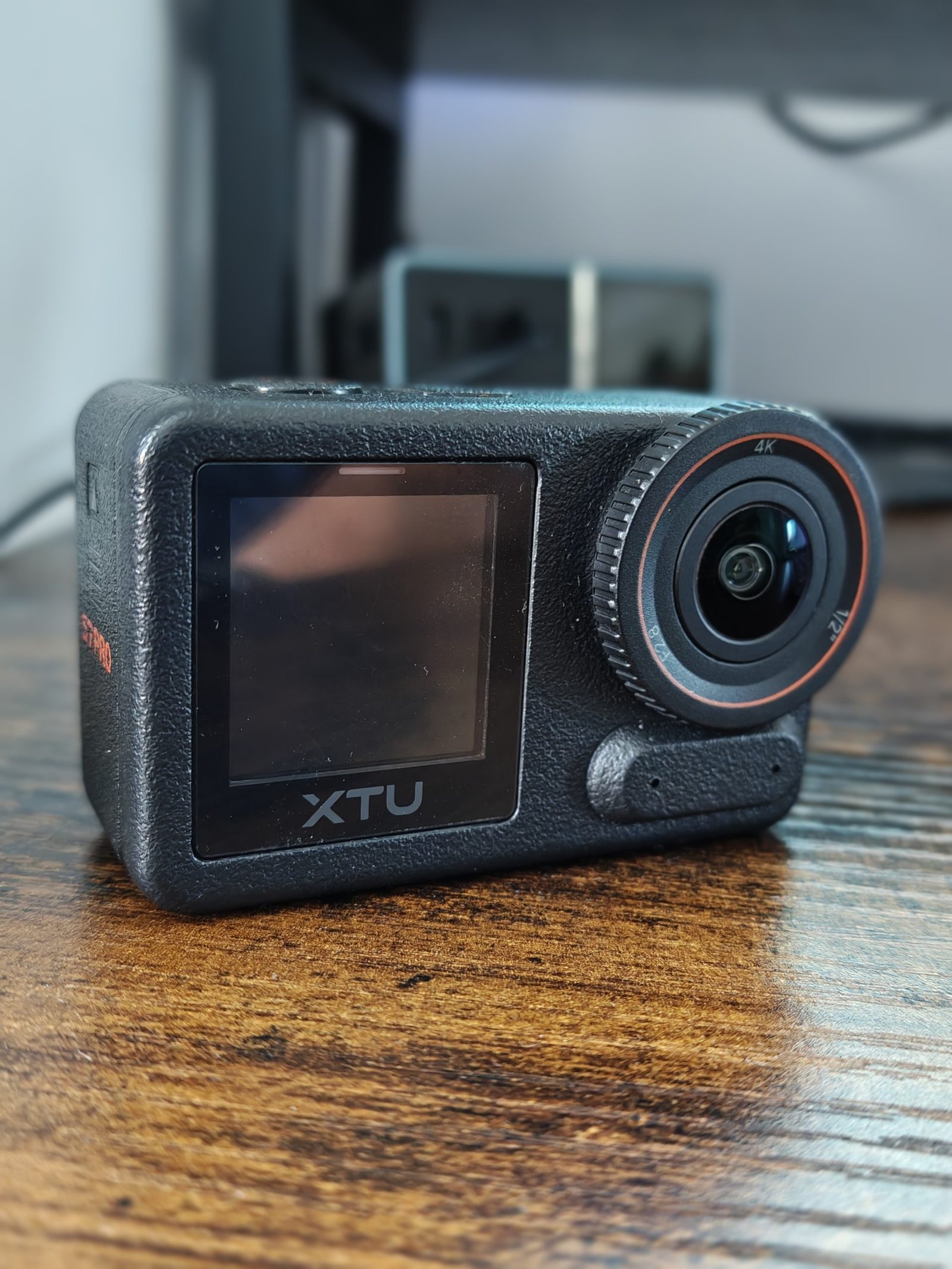
- The Front: Dominating the front is a massive lens housing holding a 152-degree, 7-element ultra-wide lens with an F2.8 aperture. Right next to it sits the front-facing screen, a crucial addition for vloggers and selfie-shooters who need to keep themselves framed.


- The Back: On the rear is a crisp 2.29-inch touchscreen. It is bright, relatively responsive, and has decent viewing angles even under direct sunlight.

- Sides and Compartments: Under a secure, latching door, you’ll find the USB-C port and the MicroSD card slot. On the other side sits the battery compartment. The buttons (Power/Mode and Shutter/OK) have a distinct, tactile click that you can easily feel even when wearing riding gloves.


2. The Mounting System: Magnetic Quick-Release.

One of the standout design features of the S7 Pro is its magnetic quick-release mounting system

Borrowing a page straight from DJI’s playbook, the bottom of the S7 Pro features a magnetic recess paired with two physical locking clips.
- Speed: You can snap the camera off your helmet mount and onto a chest rig or a tripod in literally two seconds.
- Security: Once it clicks into place, it is physically locked. You have to pinch the side buttons to release it. Even on bumpy motorcycle track days, the camera does not budge.
- Compatibility: The bottom of the quick-release plate adapts to the standard action camera two-prong system, meaning it is fully compatible with the massive ecosystem of GoPro-style mounts you probably already own.

3. Under the Hood: The Hardware & The AI Secret Sauce.
The core appeal of the S7 Pro lies in its internal hardware pairing:
The Sony IMX586 1/2-Inch Sensor
While flagship cameras are moving toward massive 1/1.3-inch sensors (like the DJI Action 5 Pro), the S7 Pro’s 1/2-inch sensor is still significantly larger than what you typically find at the $150 price point. A larger sensor means larger pixels (1.6µm), which translates directly to cleaner light gathering and better dynamic range.
The HiSilicon AI ISP
XTU has integrated a HiSilicon AI Image Signal Processor. This processor acts as an intelligent brain, applying real-time AI exposure adjustments, local tone mapping, and noise reduction algorithms. This is particularly noticeable in high-contrast scenes—like riding through a forest where you are constantly transitioning between bright sunlight and dark tree shadows. The AI quickly balances the exposure to prevent the sky from blowing out into pure white while keeping the dark foliage detailed
4. Video Performance, Settings, and Modes.
The S7 Pro offers a versatile array of resolution and frame-rate options, but it also comes with some interesting technical quirks.

The 4K 50fps Quirk
You might notice that the top-tier 4K setting maxes out at 50fps rather than the industry-standard 60fps. While this might seem odd, it is likely a deliberate thermal and processing limitation of the budget-friendly chipset. In practice, the difference between 50fps and 60fps is negligible to the human eye, and 50fps still provides plenty of temporal overhead to slow down your footage slightly in a 24fps or 25fps editing timeline for a cinematic look.
The 4K footage itself is sharp, contrasty, and punchy. Colors are vibrant out of the box, though purists might find them slightly oversaturated in the default profile.
Video Modes Available
The S7 Pro features several distinct video capture modes:
- Normal Video: Your standard point-and-shoot video recording.
- Lapse Video (Time-Lapse): Captures frames at set intervals (0.5s up to 60s) and compiles them into a ready-to-watch video.
- Slow Motion: Captures high-frame-rate footage at 1080p (up to 120fps) to stretch out fast-moving action.
- “Quick Stories”: Short, bite-sized clips designed for instant social media sharing.
- Underwater Mode: Adjusts the white balance automatically to compensate for the heavy blue/green color cast experienced underwater.
- Car Mode (Loop Recording): Turns the S7 Pro into a highly capable dashcam. When the SD card fills up, it automatically overwrites the oldest files. It also supports Emergency Loop Recording to save clips in case of sudden G-force changes.
- Pre-Recording: This is a killer feature usually reserved for premium cameras. The S7 Pro can continuously buffer up to 50 seconds of 4K video before you press the record button. If you are waiting for a fish to bite or a skateboarder to land a trick, you don’t have to waste gigabytes of card space waiting—just hit record after it happens, and the camera saves the preceding 50 seconds.
Some examples
5. The Stabilization Showdown: SuperSmooth 5.0 vs. Gyroflow
An action camera is only as good as its image stabilization. If your footage looks like an earthquake, it’s unusable. XTU tackles this with a multi-tiered approach that is genuinely impressive.
Internal Stabilization 5.0
The S7 Pro features four distinct in-camera stabilization settings:
AndroidGuys
- Off: No stabilization. Yields the widest possible field of view (FOV).
- Super: Basic electronic image stabilization (EIS). Good for gentle walking or vlogging.
- Super Enhance: Aggressive in-camera stabilization. This smooths out heavy vibrations, footsteps, and cycling bumps.
- 360° Horizon Lock: The camera uses its internal sensors to lock the horizon completely level. You can roll the camera a full 360 degrees, and the video remains perfectly upright. This is an absolute boon for motorcyclists and mountain bikers.
The Crop Caveat
It is important to understand how electronic stabilization works: the camera crops into the sensor and moves the crop window around to counteract motion.
⚠️ The Trade-off: When you activate “Super Enhance” or “Horizon Lock,” the camera crops the image significantly. This reduces your wide-angle perspective. Furthermore, you cannot use the zoom function when any form of stabilization is active.
The Secret Weapon: Gyroflow Support
For professional creators, the absolute best feature of the XTU S7 Pro is native Gyroflow compatibility.
Instead of forcing the camera’s budget processor to stabilize the video in real-time, you can set the stabilization to “Gyroflow” mode. The camera records the raw, unstabilized ultra-wide video file alongside a separate metadata track containing precise real-time data from the camera’s internal gyroscope.
When you import the footage into the free, open-source Gyroflow software on your computer, it uses that gyro data to stabilize the footage in post-production. The results are vastly superior to any in-camera EIS, giving you buttery-smooth, cinematic stabilization with precise control over how much you want to crop.
6. Photo Settings and Performance.
While action cameras are bought primarily for video, the S7 Pro is no slouch in the photography department. It captures native 48MP stills.
The Out-of-the-Box Mistake
When you first turn on the camera, the image quality is set to “Standard” by default. In this mode, photos can look a bit soft and overly compressed.
Crucial Setup Step: Go immediately into the camera settings and change the image quality from “Standard” to “High”. This unlocks the true potential of the 48MP Sony sensor, resulting in vastly sharper details, better micro-contrast, and cleaner edges.
Photo Modes
- Normal Photo: Quick 48MP snapshots.
- RAW Support: Crucial for photo editors. It saves uncompressed files alongside JPGs, allowing you to salvage shadow and highlight details in Lightroom.
- Time-Lapse / Lapse Photo: Captures photos at regular intervals to be stitched together manually later.
- Long-Exposure: Perfect for night photography, light painting, or creating silky-smooth waterfall shots.
- Burst Photo: Snaps a rapid sequence of shots—ideal for capturing the exact moment of a jump or action sequence.
- Timing Photo: A simple self-timer (delay) mode


7. Audio, Connectivity, and Software.
Audio & AI Noise Reduction
Budget action cameras are notorious for sounding like you are recording underwater inside a tin can. The S7 Pro improves on this by supporting wireless Bluetooth microphones.
If you pair it with a wireless mic, you can use the built-in AI noise reduction. This algorithm acts as a digital high-pass filter, targeting low-frequency wind noise and engine hum while keeping your voice clear. While it won’t replace a dedicated studio setup, it is a massive upgrade for moto-vloggers who want to narrate their rides without drowning in wind shear.
Connectivity & Wi-Fi 6
Equipped with 5GHz Wi-Fi 6, wireless transfers to your smartphone are noticeably faster than older 2.4GHz cameras.
- The App: The companion app, XTU GO, allows you to control the camera, change settings, and download media. The app is functional, though it suffers from typical budget-app clunkiness and occasionally requires a couple of attempts to pair successfully.Scargill’s Tech Blog+ 1
- PC Webcam & USB Storage: Plugging the S7 Pro into a PC via USB-C is beautifully simple. It instantly prompts you to choose between USB Storage (the camera acts as a simple flash drive to drag-and-drop files) or PC Camera. In PC Camera mode, it functions as a plug-and-play webcam with an ultra-wide field of view—ideal for OBS Studio streaming or Zoom meetings.
8. Battery Life and Power Quirks.
The camera is powered by an 1800mAh battery that supports Power Delivery (PD) fast charging.
Battery Endurance
Under typical use, recording in 4K at 50fps with AI processing and Super Enhance stabilization turned on, you can expect around 70 to 80 minutes of continuous recording. If you drop down to 1080p and turn off the advanced stabilization, you can push past the 100-minute mark.
However, because the AI ISP is working hard to process images in real-time, the camera can run quite warm, and the battery does drain fairly fast under heavy 4K loads. Carrying a spare battery is highly recommended for full-day outings.
The Emergency Reverse Charging Feature
In a bizarre but incredibly handy design choice, the XTU S7 Pro supports emergency reverse charging. If your smartphone is on the verge of dying in the wilderness, you can plug a USB-C to USB-C cable from the camera to your phone, and the camera’s 1800mAh battery will act as a mini power bank to give your phone a quick boost of life.
9. Comprehensive Feature Summary
To help weigh up everything this budget contender has to offer, here is a quick breakdown of its strengths and weaknesses:
Good Points
- Outstanding Value: At around $159, it offers features usually locked behind a $300+ price tag.
- Gyroflow Metadata Support: A massive win for editors who want professional, post-processed stabilization.
- Sony Sensor & AI Processor: Great dynamic range and sharp detail once image quality is set to “High”
- Magnetic Quick-Release: Fast, secure, and incredibly convenient to use.
- Dual Screens: Makes framing yourself easy and accessible for vloggers.
- Useful Extra Features: 50-second 4K pre-recording, loop recording for cars, and emergency reverse phone charging.
Bad Points
- Not Natively Waterproof: Requires an external case for any underwater activities.
- Heavy Stabilization Crop: “Super Enhance” and “Horizon Lock” cut deep into the field of view.
- Battery Heat & Drain: Tends to run warm and deplete quickly under heavy 4K processing.
- Clunky App Connection: The XTU GO app can sometimes be finicky to connect on the first try.
10. The Verdict: Is the XTU S7 Pro Worth It?
If you are a professional extreme sports athlete whose livelihood depends on capturing 4K 120fps slow-motion footage in the pouring rain without a case, you still need to buy a DJI Osmo Action or a GoPro.
However, if you are a motorcyclist, cyclist, casual traveler, vlogger, or everyday creator who wants smooth, stabilized 4K footage without draining your life savings, the XTU S7 Pro is an absolute home run.
By focusing its budget on what truly matters—a solid Sony sensor, clever AI processing, robust mounting, and genius Gyroflow compatibility—XTU has created a camera that punches far above its price tag. Just remember to switch the image quality to “High” on day one, and you’ll have a highly capable, incredibly fun creative tool ready for any adventure.
