

Earlier this year, the Thread Group unveiled version 1.4 of the low-power smart home protocol. One of the key improvements was easy cross-ecosystem interoperability – meaning that Thread-based smart home devices from various brands can work in unison instead of each brand requiring its own control app.
Samsung’s SmartThings is one of the first smart home ecosystems to add support for this network unification. This is supported on select SmartThings Hubs (including the Aeotec Smart Home Hub and the Aeotec Smart Home Hub 2) and will be added to more hubs soon.
Aeotec Smart Home Hub 2
First, some terminology. An End Device is something you can control over the Thread network, e.g. a smart light bulb. A Router additionally retransmits messages to help create a mesh network that has an extended range and reliability. Finally, a Border Router is a bridge between the Thread network and a Wi-Fi or Ethernet network.
The SmartThings Hubs are border routers and you can pair them with other Thread-based devices in one of two ways. You start by going to Manage Thread Network in the SmartThings Hub interface, Settings, Manage Thread network then Unify Thread network.
From here, you can select Share SmartThings network, which will give you a QR code and a one-time passcode (OTP). Using either the QR or OTP code, you can add third-party Border Routers to your SmartThings Thread network.
If you already have a Thread network built with third-party devices and you just bought a SmartThings Hub, you pick the other option – Join another network. Use a QR or OTP code from the third-party app to add the SmartThings Hub to the existing network.
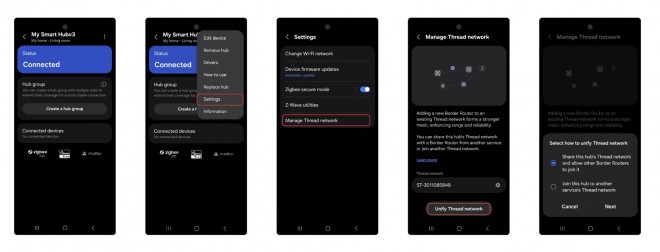
Thread network unification using the SmartThings app
You can read more about Thread network unification using SmartThings Hubs here and more about Thread here.
