

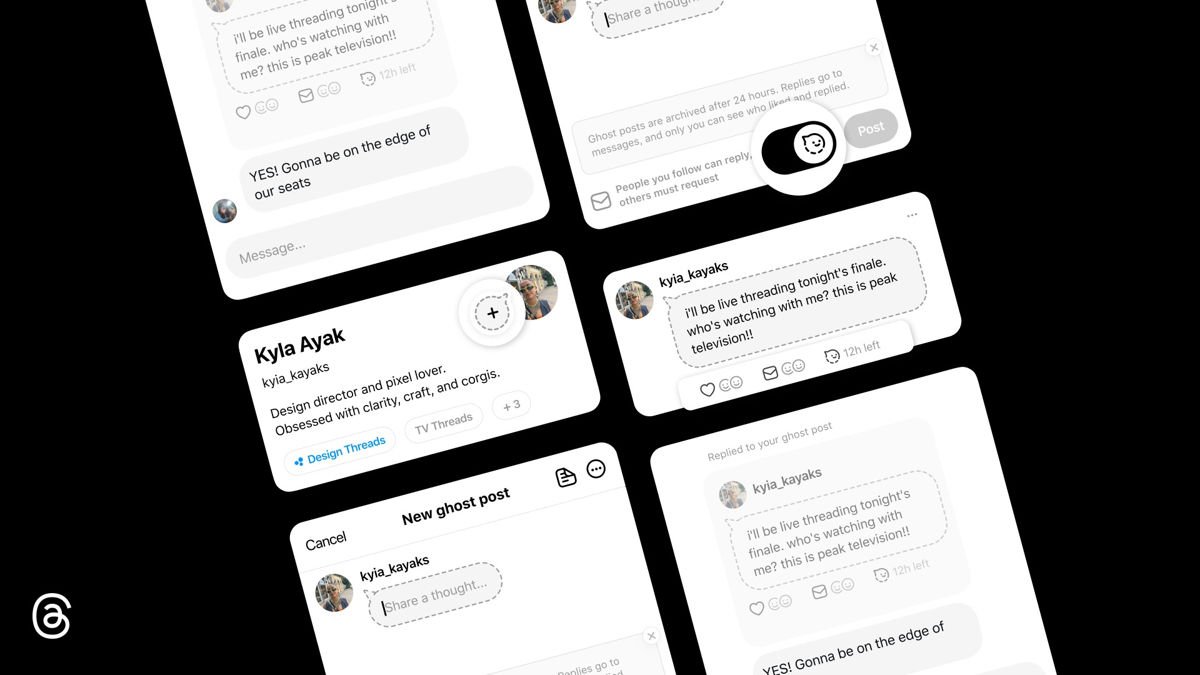
Meta just added disappearing posts to Threads, giving users a way to share updates that automatically vanish after 24 hours. The company is calling them “ghost posts,” and the feature addresses that age-old social media question: what if I want to say something without it living on my profile forever?
If you’ve been using Threads since its launch, you know the app has come a long way from its bare-bones beginnings. The platform now has over 400 million users and continues adding features to compete with X. This latest addition borrows from Instagram Stories’ playbook, bringing that same ephemeral vibe to text-based posts.
What Makes Ghost Posts Different
When you share a disappearing post on Threads, it shows up in your followers’ feeds with a distinctive gray or dotted chat bubble design. There’s also a countdown timer so everyone knows it’s temporary. After 24 hours, the post disappears from public view, though it gets archived privately for you to reference later if needed.
The privacy angle is interesting. Replies to these posts go straight to your inbox as private messages instead of showing up publicly. Only you can see who liked or replied, and engagement numbers stay hidden from everyone else. It’s a different approach compared to regular posts where everything is out in the open.
Meta says the feature is designed to encourage spontaneous sharing and authentic conversation. The idea is that you’ll feel more comfortable posting quick thoughts or hot takes when you know they won’t be permanently attached to your profile. Whether that actually changes how people use the app remains to be seen.
How to Create a Disappearing Post

- Open the Threads app and start a new post like usual.
- Look for the ghost icon (often a gray smiley face or dotted chat bubble) in the composer menu.
- Toggle the ghost icon on to make your post a disappearing post.
- Write your message, idea, or update, then publish as normal.
- The post will show up in followers’ feeds with a distinctive design and a countdown timer.
- Replies go to your private inbox (not public), and only you can see who interacted.
- After 24 hours, the post disappears from public view but stays in your archive for future access or unarchiving if needed.
