

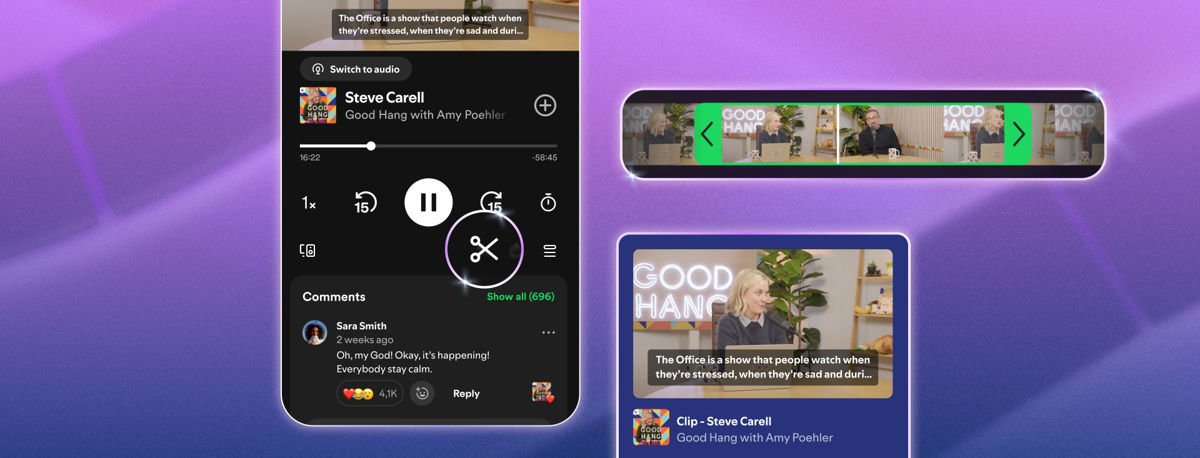
Sharing a specific podcast moment has always been clunky. You send the whole episode with a timestamp and hope your friend actually skips to it. Spotify is trying to fix that.
The company launched Spotify Podcast Clips on Wednesday. The new feature lets listeners trim and share specific moments from episodes directly inside the app. It’s rolling out now to both Free and Premium users on mobile.
How It Works
To make a clip, tap the new scissors icon in the Now Playing view. You’ll get a selector to mark the start and end of the moment you want. From there, preview it, save it, or send it out. Saved clips live in a dedicated folder inside Your Library, where you can revisit them or drop them into a podcast playlist.
The updated sharing menu gives you four options: full episode, chapter, timestamp, or clip. You can send directly through Spotify Messages or share to any other supported app.
Spotify Podcast Clips work for both audio and video podcasts. Availability is expanding gradually across shows, so not every podcast will support it right away. Spotify says early testing showed that the feature increased how often users saved podcasts overall.
The timing is a little notable. YouTube killed its user-facing Clips feature back in April, replacing it with a simpler timestamp-sharing option. Spotify is essentially picking up what YouTube put down, just applied to podcasts instead of video.
This fits into a broader push Spotify has been making around podcasts lately. The company recently announced Spotify Memberships for creators, and has been rolling out podcast discovery updates to make finding and following shows easier. Spotify Podcast Clips fits that same pattern. Whether listeners actually use it regularly is the real question.
