

Keeping kids safe online isn’t what it used to be. A decade ago, you could stick parental controls on the family computer and call it a day. Now? Kids have their own phones, tablets, and access to pretty much everything. That’s where AirDroid Parental Control comes in.
AirDroid parental control is a comprehensive monitoring app that gives parents real control over their kids’ digital lives without being overbearing. It handles everything from screen time limits to location tracking, and it works on both Android and iOS devices. The app’s designed to keep kids safe while helping them build healthy tech habits.
Simple setup process
Setting up AirDroid parental control takes about five minutes, which is refreshing compared to other parental control apps that make you jump through hoops. Parents download the AirDroid Parental Control app on their phone first. Once you’ve created an account, the app generates an invite code or link that you’ll use to connect your kid’s device.
On your child’s phone or tablet, you’ll install the companion app called AirDroid Kids. Enter the invite code from the parent app, and the two devices link together automatically. The setup wizard walks you through granting the necessary permissions, which varies depending on whether you’re setting up an Android or iOS device. Android requires accessibility permissions and device administrator access for full functionality. iOS uses Apple’s MDM profile system, which you’ll need to install and accept.
Once both apps are linked, you can manage up to 10 devices from a single parent account. This makes it easy for families with multiple kids or if you need to monitor both a phone and tablet for the same child. The whole process is straightforward enough that you don’t need to be tech-savvy to get it working.
Safety features you can expect
Location tracking is one of the core safety features parents care about most. AirDroid parental control uses GPS to show your kid’s current location on a map in real time. But it goes beyond just seeing where they are right now. You can also view their location history throughout the day, so if your kid says they were at the library after school, you can verify that.
Geofencing takes location tracking a step further. You can set up virtual boundaries around specific places like home, school, a friend’s house, or anywhere else. When your kid enters or leaves one of these zones, you get an instant alert. It’s like having a 24/7 guard following them around, except it’s all automated through the app.

For Android devices specifically, AirDroid parental control offers remote camera access. This lets you activate your kid’s front or rear camera to see their surroundings. You can take photos or record short videos remotely, which is helpful if you’re not sure where your child actually is or want to check their environment. The one-way audio feature works similarly, letting you hear background sounds through their phone’s microphone.
Screen mirroring is available on Android as well. You can view your kid’s screen in real time from your own phone. Whatever they’re doing, you’re seeing it as it happens. This is particularly useful for younger kids who might not understand when they’re in a risky situation online. You can watch them browse, see what apps they’re using, and observe their social media activity without having to physically take their phone away.
Battery monitoring might seem minor, but it’s genuinely practical. The app tracks your child’s device charging status and sends notifications when the battery is running low. This ensures your kid charges their phone before it dies, so you can always stay in touch with them.
Last but not least, the AirDroid parental control app comes with an emergency SOS feature. This allows your child to send an SOS alert. When they do, you will receive real-time location and on-site audio recordings immediately. This will help you not only pinpoint their location, but provide extra details that could be crucial for first responders.
Controlling what kids can access

App blocking gives you instant control over which apps your kid can use. From the parent app, you can see every app installed on their device and block inappropriate browsers, games, or social apps with a single tap. You can also set time limits for specific apps, so your kid might get 30 minutes of TikTok per day but unlimited access to educational apps. The “Always Allowed” feature lets you designate certain apps that work even during downtime.
Web filtering lets you can block specific websites or entire categories like gambling sites, adult content, or violent games. AirDroid parental control includes a managed browser that gives you even more supervision, letting you monitor browsing history in real time and create website whitelists for approved sites only.
Content monitoring is where AirDroid parental control really stands out from basic tools like Google Family Link. The app monitors social media platforms including Instagram, WhatsApp, Snapchat, Facebook, TikTok, YouTube, Reddit, and Discord. It scans for keywords related to explicit content or cyberbullying and sends alerts immediately. The inappropriate image detection feature scans photos on your kid’s device and flags explicit content.
Screen time management is flexible and easy to adjust. Set daily limits for total device usage, create downtime schedules for homework or bedtime, and configure different rules for weekdays versus weekends. When your kid reaches their limit, the device locks automatically.
The parent dashboard keeps everything organized

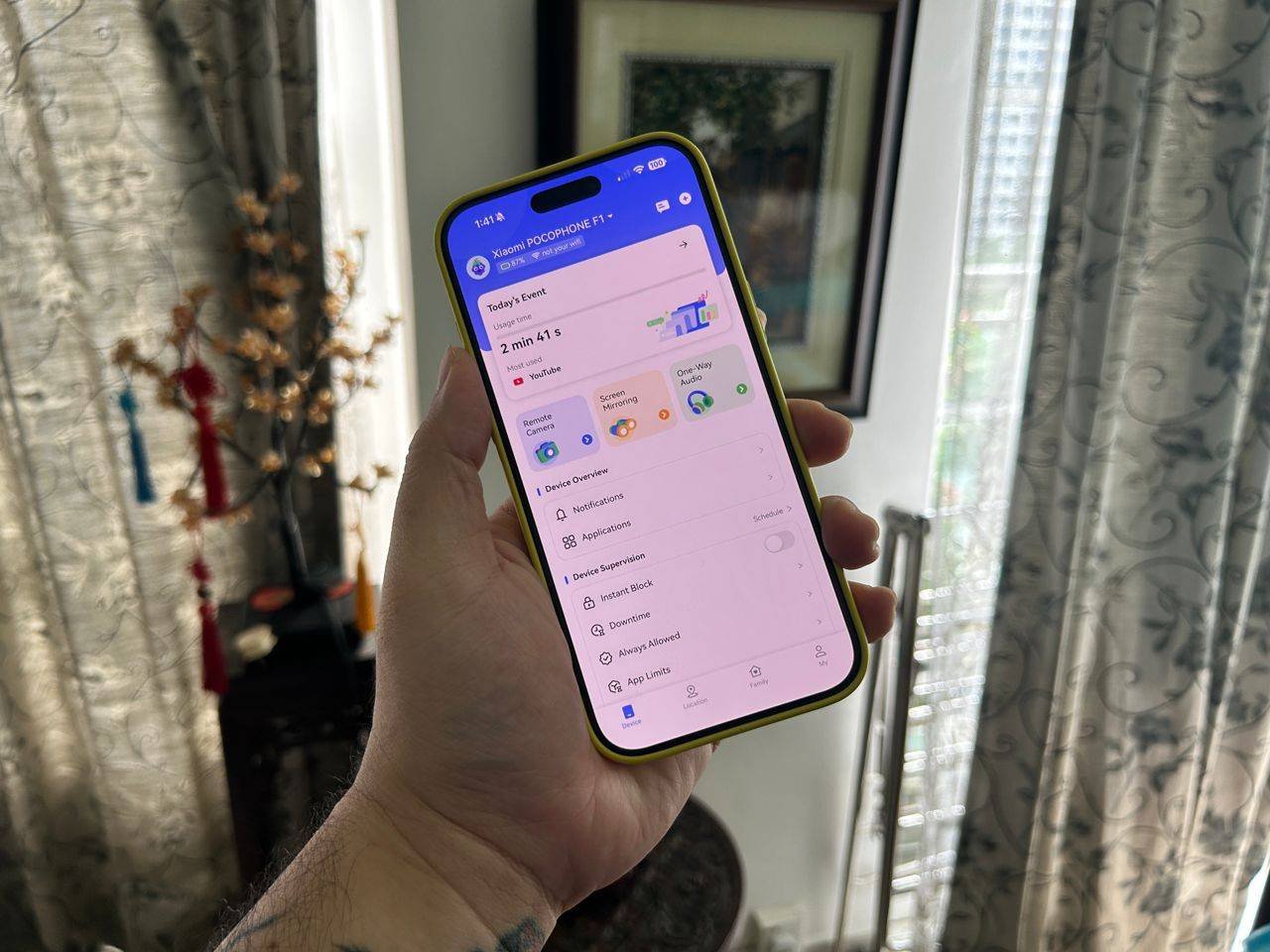
When you open the AirDroid Parental Control app, the dashboard shows you everything at a glance. Today’s Event displays your kid’s daily and weekly app usage, showing how long each app was used and how many notifications they received. You can also see cellular data consumption per app.
The main screen gives you quick access to all the parental controls. You can instantly block an app, check their current location, view notifications they’ve received, or adjust screen time limits.
Notifications sync from your kid’s device to yours in real time. You can see every notification they receive, from text messages to social media alerts. If a notification looks concerning, you can mute that specific app or block it entirely right from the notification view. The app also shows pending requests when your kid asks for extended screen time or wants to download a new app.
Location information is always visible on the dashboard with their current battery level, last known location, and any geofence alerts. For families managing multiple kids, you can switch between different child profiles from the dashboard, with each kid getting their own set of controls and monitoring data.
Understanding the limitations
Feature availability depends heavily on whether your child uses Android or iOS. Android devices get the full suite including screen mirroring, remote camera access, one-way audio, and stealth mode. iOS is more limited due to Apple’s privacy policies. You can still track child’s phone location, set app limits, block apps and websites, and use social content detection on iOS, but you won’t get screen mirroring or remote camera access. Stealth mode only works on Android, so the app remains visible on iOS devices.
What it costs
AirDroid parental control offers a three-day free trial with access to all premium features. After that, monthly plans cost $9.99, quarterly runs $19.99 (about $6.66 per month), and annual subscriptions are $59.99 (roughly 16 cents per day). One subscription covers up to 10 devices, so you don’t need separate accounts for each kid. The yearly plan offers the best value for parents committed to long-term monitoring.
AirDroid parental control delivers a complete solution for parents serious about digital safety. It’s not just about blocking apps or limiting screen time. It’s about understanding your kid’s digital behavior, spotting potential problems early, and helping them navigate the internet safely.
